Reception and appointments
Run the clinic day from booking to completed visit
Reception and appointments in Modirify are part of one system for managing a dental clinic. The calendar, reception board and patient record share the same clinic context, so a solo dentist or a larger team can follow the day without rebuilding it from a notebook, a chat and an accounts sheet. Each capability still follows clinic settings, user permissions and the active plan.
Direct answer
What does the reception and appointments pillar manage?
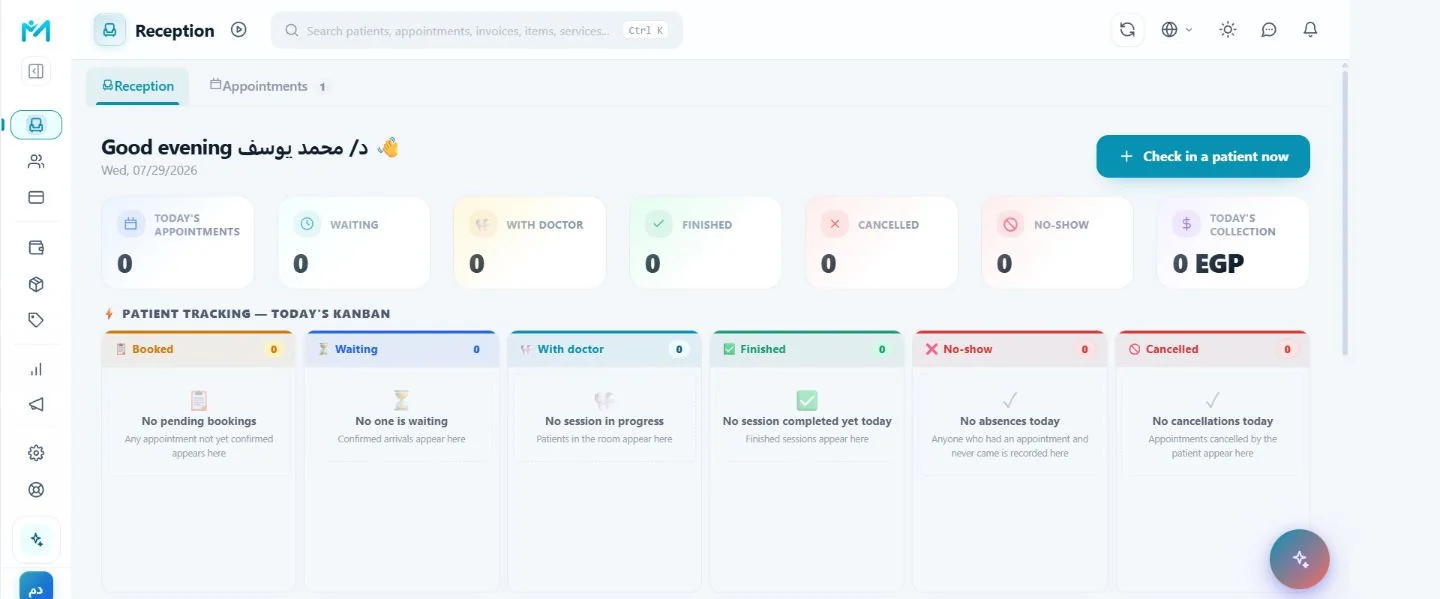
It manages the operational path from creating or changing an appointment through arrival, waiting, treatment and visit completion. The clinic can see the current state, detect available practitioner conflicts, use a waiting list, and connect enabled public booking and WhatsApp confirmation paths to the same schedule instead of maintaining separate copies.
01Reception and appointments
These are shipped capabilities or controls governed by the stated configuration, plan and consent boundaries.
Core capabilities
The appointment and reception controls in the product
These are shipped capabilities or controls governed by the stated configuration, plan and consent boundaries.
Visual reception board for waiting, in-treatment and completed visits.
Waiting list and a clear daily patient-flow status.
Public online booking link according to clinic settings.
WhatsApp appointment reminders and confirmations according to configuration, plan and consent.
Practitioner reassignment with available conflict checks.
One path for different clinic sizes
Reception work without a disconnected handoff
Existing solo-clinic and team workflows describe the same job at two different scales.
A solo dentist can close the loop immediately
A dentist working alone, or with one assistant, has no time for a system that needs training. Modirify puts appointments, the patient record and the invoice on one short path, so the visit can be closed and recorded at the same time instead of leaving the work to the end of the day. The same screen records the appointment, check-in, session and invoice.
A team sees one daily state
Instead of an appointment book and an accounts sheet, the reception board shows the day’s appointments and every patient’s status. Reception can see who is waiting and who is done, while the dentist opens the patient record from the same operational context. Recorded states stay visible instead of living in separate chats or paper notes.
Practitioner schedules remain distinct
In a clinic with several dentists, the system blocks two conflicting appointments for the same dentist and supports practitioner reassignment with the available conflict checks. Every session remains tied to its dentist, so the clinic does not have to reconstruct who treated whom after the day has ended.
Cancellation becomes an operational signal
Recording attended, cancelled in advance and failed-to-attend outcomes separately matters. A cancellation can be offered to someone on the waiting list; a sudden no-show cannot. A confirmation message surfaces an at-risk appointment before the visit, while the waiting list gives reception a prepared next action when a slot opens.
Workflow
From clinic setup to daily review
A practical sequence keeps the schedule, ownership and patient state clear.
Configure the clinic day
Set working hours, services, practitioners, team access and the booking or reminder options the clinic intends to use.
Create or receive the booking
Record the patient and appointment from the clinic screen, or receive an eligible booking from the enabled public entry point.
Follow arrival and treatment
Use the reception board to move the visit through waiting, in-treatment and completed states without creating a second list.
Review the result
Keep the appointment outcome, linked patient record and available operational reports ready for the next action.
Daily value
Why one reception record matters
Less end-of-day reconstruction
The team records the day while it happens instead of collecting notes after the final patient.
Clear responsibility
Reception, practitioners and management use the same clinic data under their respective permissions.
A usable next action
Unconfirmed, cancelled, waiting and completed states tell the team what needs attention next.
Clear answers
Frequently asked questions
Can one person run this workflow?
Yes. The solo-dentist flow is designed so the same screen can record the appointment, arrival, session and invoice without requiring a receptionist.
How are scheduling conflicts handled for a team?
The system blocks conflicting appointments for the same practitioner and applies available conflict checks when a practitioner is reassigned.
Does public booking always have to be enabled?
No. Online booking can be enabled or disabled from clinic settings, and the public link follows the clinic configuration.
Are WhatsApp confirmations automatic for every patient?
They apply only when the channel is enabled and according to clinic configuration, the active plan, patient consent and opt-out state.
Start with Modirify
A cloud platform that helps dental clinics manage everyday work in one place.
Start with Modirify