WhatsApp appointment reminders
Turn appointment messages into a controlled follow-up flow
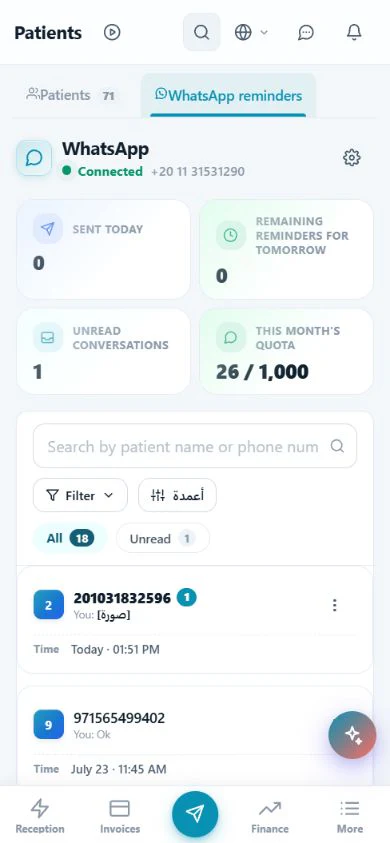
WhatsApp reminders in Modirify connect the upcoming appointment, its confirmation state and the clinic conversation inbox. The channel operates only when it is enabled and according to clinic settings, plan limits and patient consent. Eligible reminder, confirmation and follow-up templates still respect opt-out state and the visible monthly message allowance.
Direct answer
What does the WhatsApp reminders pillar manage?
It manages eligible appointment reminders, confirmation and cancellation messages, sent-message and unread-conversation indicators, and patient replies in a clinic-linked inbox. It also shows the monthly quota and remaining usage. Consent, opt-out, template eligibility, channel policies and plan limits remain boundaries on sending.
01WhatsApp appointment reminders
Communication follows the enabled channel, clinic configuration and required consent.
Core capabilities
Verified reminder and conversation controls
Communication follows the enabled channel, clinic configuration and required consent.
Confirmation and cancellation messages that help reception know the status before the visit.
At-a-glance counts for sent messages, tomorrow’s reminders and unread conversations.
A clinic-linked conversation inbox for following patient replies.
Visible monthly quota and remaining usage.
Consent, opt-out and plan limits respected for eligible messages.
Compliant messaging boundaries
Consent and timing are part of the workflow
Existing reminder and no-show guidance treats the message as an operational prompt, not unrestricted outreach.
Enable the channel deliberately
Reminders, confirmations and follow-up apply when the WhatsApp channel is enabled. Clinic configuration and the active plan determine what is available, while consent determines whether an eligible patient communication can be sent. A communication feature is not permission to message every patient.
Use an eligible template for its stated purpose
Reminder, confirmation, cancellation and follow-up templates belong to the configured clinic workflow. Template eligibility and channel policies remain part of delivery; changing the wording does not remove the need for patient consent, a valid message purpose, opt-out handling or the applicable plan limit.
Remind early enough for a useful reply
A reminder a day or two ahead gives the patient a genuine chance to say they cannot attend. The purpose is not to pressure attendance, but to learn the answer early enough to reschedule the visit or offer the released time to someone on the waiting list.
Ask for confirmation and follow the state
A message that asks for an explicit reply surfaces at-risk appointments. The reception board shows each appointment state, while the conversation inbox keeps patient replies connected to the clinic. An unconfirmed appointment can then receive the appropriate follow-up rather than disappearing inside a personal chat.
Keep caps and stopping rules visible
The WhatsApp screen shows the monthly quota and remaining usage, and pricing publishes the commercial message allowance for each plan. Eligible communication respects consent and opt-out state. The patient must have a clear way to stop receiving messages, and repeated messages are not a substitute for timing and a useful request.
Workflow
From enabled channel to reception follow-up
The patient choice, plan boundary and appointment state remain visible.
Confirm configuration and consent
Use the channel only when enabled and verify the patient communication is eligible.
Send the appropriate template
Use the configured reminder, confirmation, cancellation or follow-up purpose within channel and plan rules.
Follow replies and quota
Read the clinic inbox, unread state, sent count and remaining monthly usage.
Update the appointment action
Confirm, reschedule, cancel or offer the slot to the waiting list according to the patient reply.
Daily value
Why governed reminders matter
Earlier appointment truth
A confirmation request reveals a likely cancellation while reception can still act.
One clinic inbox
Replies remain in a clinic-linked conversation flow instead of scattered personal chats.
Visible boundaries
Consent, opt-out and remaining plan usage stay part of the sending decision.
Clear answers
Frequently asked questions
Do reminders require patient consent?
Yes. WhatsApp communication is subject to patient consent and channel policies, and the patient needs a clear opt-out path.
Is every message outside the plan cap?
No. The screen shows the monthly quota and remaining usage, and plan limits apply to eligible messages.
Why ask the patient to confirm?
An explicit reply identifies an at-risk appointment early enough for rescheduling or waiting-list follow-up.
Are templates a bypass around consent?
No. Eligible templates still follow consent, opt-out, channel-policy and plan-limit boundaries.
Start with Modirify
A cloud platform that helps dental clinics manage everyday work in one place.
Start with Modirify