Voice diagnosis and dental chart
Speak the finding, then review every chart change
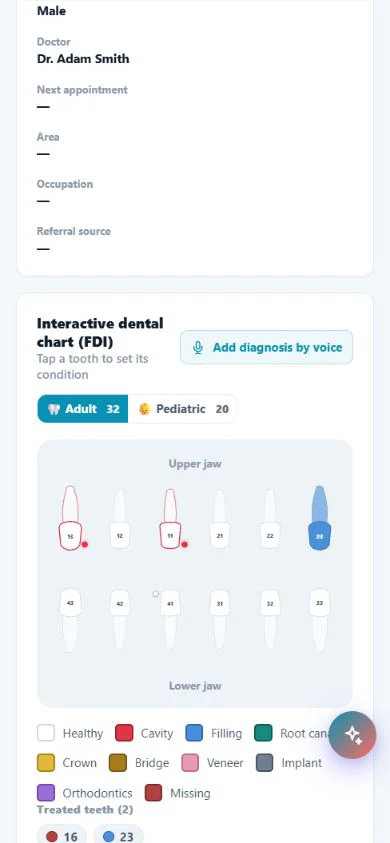
Voice diagnosis in Modirify is an input workflow inside the patient record and dental chart, not a replacement for the dentist’s judgment. It converts speech to text, presents suggested teeth and conditions for step-by-step review, and attaches the result to the clinical record only after the user approves it. The dentist remains responsible for the clinical review and final record.
Direct answer
Does voice diagnosis make the clinical decision?
No. The feature starts from the patient record and proposes structured chart input from the clinician’s speech. The clinician reviews the transcript, confirms suggested teeth and conditions step by step, and approves the result before it is attached to the patient’s clinical record.
01Voice diagnosis and dental chart
A visible review step stays between speech and the patient record.
Core capabilities
Verified voice-charting boundaries
A visible review step stays between speech and the patient record.
Convert speech to text and review it before committing changes.
Confirm suggested teeth and conditions step by step to reduce input errors.
Attach the approved result to the patient’s clinical record.
A bilingual Arabic and English workflow inside the product.
The voice recording is not retained after it is converted to text under the feature design.
Assisted input with a human gate
Keep the dentist between the suggestion and the chart
Review, confirmation and approval happen before the record changes.
Begin in the correct patient context
Voice diagnosis starts from the patient record and dental chart itself. The authorized user is already in the record that will receive the approved result, with visit history and treatment context available for review. The spoken input is not a detached note waiting to be matched later.
Speech becomes text before it becomes a record
The spoken description is converted to text and shown for review. The transcript is intermediate input, not a committed clinical conclusion. The user reads what was captured before moving to structured suggestions, rather than allowing audio to write silently into the chart.
Confirm each suggested item
Suggested teeth and conditions are confirmed one step at a time to reduce input errors. This is the dentist-review boundary: the feature organizes the spoken description, while the clinician decides whether each proposed chart item is correct.
Attach only the approved result
The result reaches the patient’s clinical record after user approval. That record keeps the treatment plan, tooth procedures, visit history, images, X-rays and attachments in one continuing context. Voice input shortens entry without creating a separate clinical source.
Limit retained input
Under the feature design, the voice recording is not retained after conversion to text. The workflow is available in Arabic and English, and the same review requirement applies in both language paths.
Workflow
From speech to an approved record
The clinical reviewer controls each transition.
Open the patient chart
Start from the correct patient record and dental chart rather than a detached voice note.
Inspect the transcript
Convert the description to text and review what the system captured.
Confirm each suggestion
Review proposed teeth and conditions step by step and correct or reject what is not appropriate.
Approve the change
Attach only the user-approved result to the clinical history.
Daily value
What the workflow changes
Less typing
The clinician describes findings aloud and reviews structured input afterward.
Visible approval
Nothing is attached until the user reviews and approves it.
One history
The approved chart result stays with the patient’s other clinical information.
Clear answers
Frequently asked questions
Does the feature diagnose instead of the dentist?
No. It structures spoken input; the dentist reviews the transcript, confirms every suggestion and approves the final record.
When is the record changed?
Only after the user reviews the suggestions and approves the result.
Is the recording retained?
Under the feature design, it is not retained after conversion to text.
Does it support Arabic and English?
Yes, with the same review and approval boundary.
Start with Modirify
A cloud platform that helps dental clinics manage everyday work in one place.
Start with Modirify